Blog

Deck Bench: The Walkthrough

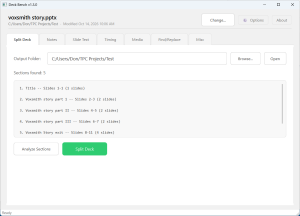
PowerPoint does a lot, but it doesn’t do everything. Meet Deck Bench, my PowerPoint utility for managing speaker notes, splitting presentations, working with audio, and fixing those little things that make PowerPoint frustrating.
Read more →

How to Narrate a single PowerPoint slide with Voxsmith

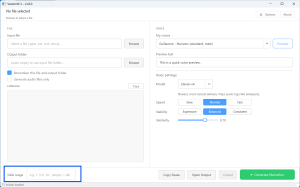
During your design phase, you’re building animations and notice a typo that was previously missed. Maybe the voice glitched on an abbreviation, or the SME decided slide 7 needed a rewrite. You don’t have to reprocess the entire deck! Voxsmith lets you process one slide at a time. Notice the box in the bottom left? […]

Read more →
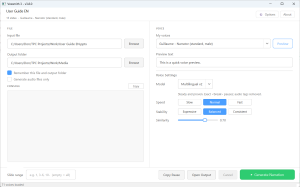
The Voxsmith window with a PowerPoint deck loaded, a voice selected, and slides ready to narrate

Voxsmith 3.8.0: Choose Your ElevenLabs Voice Model

Voxsmith 3.8.0 is out today for Windows, and it’s a free update for everyone who already owns Voxsmith. The big change is a new Model dropdown at the top of Voice Settings. Until now, every narration Voxsmith made used ElevenLabs’ Multilingual v2 model. Now you can pick the model yourself: Multilingual v2, Eleven v4, Eleven […]

Read more →

How to Import Speaker Notes from Word Back into PowerPoint

If you build narrated training, your speaker notes aren’t really notes. They’re the script. And scripts get reviewed. The usual routine goes like this: you export the notes to Word so the SME can mark them up, the SME sends back a clean edited doc, and then you spend the afternoon copying and pasting paragraphs […]

Read more →

Deck Bench – The PowerPoint Buttons you wish existed

Anyone who builds training from PowerPoint knows the part of the job nobody puts in the project plan. You split the 140-slide master deck into modules. You send the narration script out for SME review, then retype every change back into the notes, one slide at a time. You fix the product name that changed […]

Read more →

Voxtext Update 1.8.2

Good morning Voxtext! There is a new version available for download. For version 1.8.2, the update includes some UI polish and, finally, a working progress bar.

Read more →

PPTools Narrator vs. Voxsmith: Comparing PowerPoint Narration Tools

Both tools eliminate repetitive PowerPoint narration work. The difference is where they fit into your production workflow. Before developing Voxsmith, I was a PPTools Narrator user. Combined with a collection of PowerPoint macros, it was part of my regular production workflow. As my projects grew, I started looking for ways to automate more of the […]

Read more →

Voxtext 1.8 – Now with Translation Manifest Delivery

Voxtext 1.8 has a new feature that most people will never see, and that’s on purpose. I built it for a workflow of my own: transcribe locally, then hand the transcript to an automation that translates it and writes the captions back, with no copy and paste between windows. When you turn on Translation Manifest […]

Read more →

Voxtext 1.6.0 Update

Voxtext has recently been updated for version 1.6 for both Windows and Mac. You can download the update from the Voxtext page. For this update, I have added in bulk processing. You can now drag a folder OR a file into Voxsmith for Transcribing. This will work against cloud folders, automatically downloading the files before […]

Read more →

How to Export Speaker Notes from PowerPoint

Speaker notes are one of the most useful parts of a PowerPoint presentation—especially for training, instructional design, and narrated presentations. They’re also surprisingly awkward to work with. If you need to review the notes from an entire presentation, PowerPoint generally expects you to work through them one slide at a time. That’s fine for a […]

Read more →